No public device server
Customer sites do not need to forward inbound VNC, SSH, RDP, or local admin ports to the device.
Front Desk is built for teams that need remote support without exposing device services to the internet. The device calls out, access is scoped, and sensitive sessions can require approval.
Customer sites do not need to forward inbound VNC, SSH, RDP, or local admin ports to the device.
Devices activate into an account and use device credentials for steady-state call-home access.
Accounts can require approval before a requested remote session is granted.
Sensitive actions should capture who performed the action, the target, the time, and the reason.
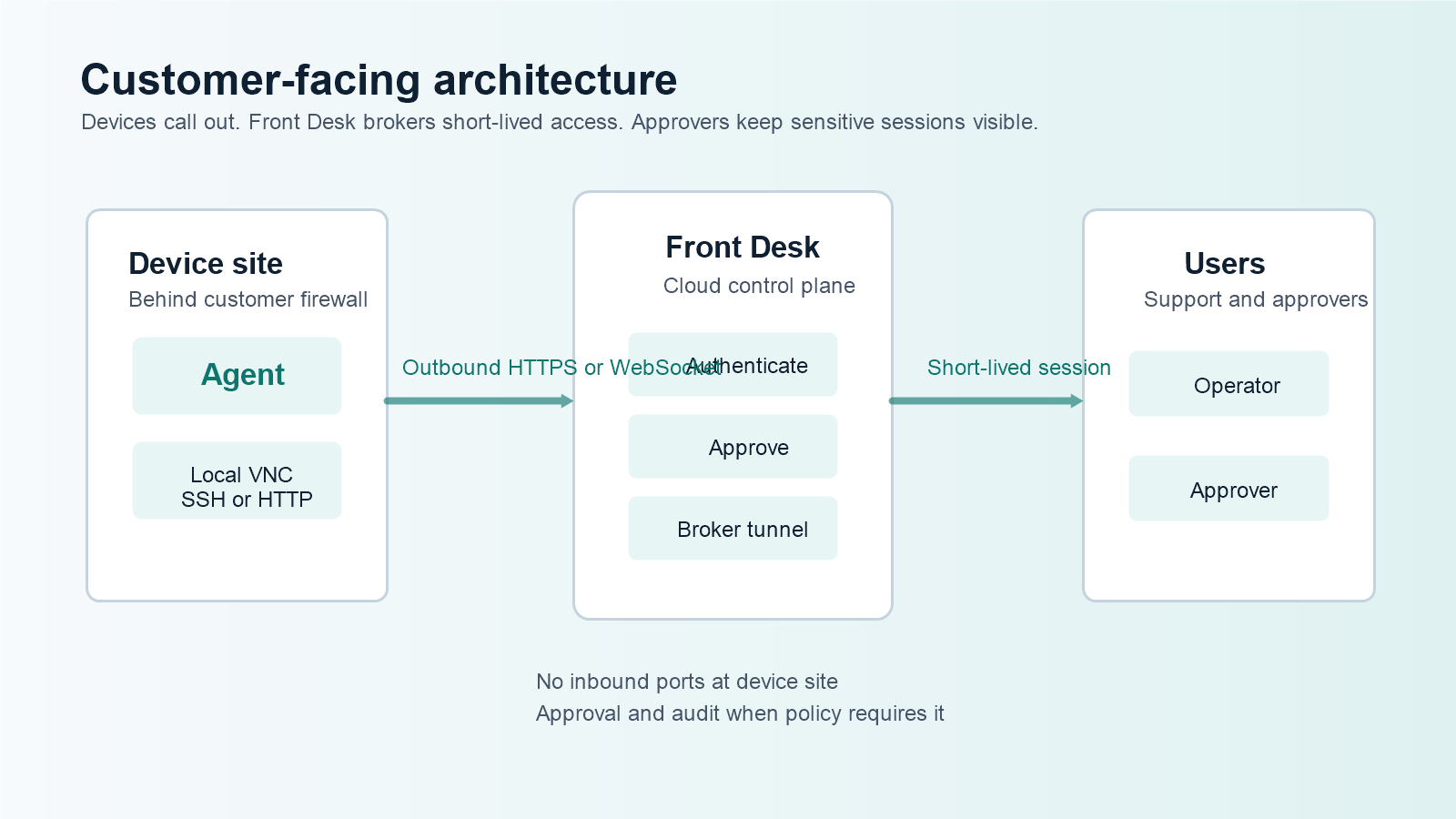
Instead of requesting an inbound firewall rule, a public remote-access service, or broad VPN access, Front Desk asks the device site to allow outbound traffic to approved Front Desk domains.
The support path remains tied to the account, device, user, approval policy, and session lifetime.
Front Desk does not assume that a network location is safe. The product direction is to authenticate the device, authenticate the operator, scope the requested access, issue short-lived session material, and record what happened.
For customer-prem devices, that is a better fit than leaving a remote desktop, SSH daemon, or web admin page listening on the public internet.
Show who is asking, which device is targeted, and what kind of session is requested.
Let the customer contact, store manager, or supervisor decide before access starts.
Keep active and historical access visible for operational review.